
Personal AI assistants are reaching everyday users. Do their permission controls make sense to the people using them?
I asked an AI agent to delete a folder. It didn't ask which folder I meant, didn't ask whether I was sure, and didn't move it to the trash. A permission I'd granted hours earlier was still doing its job.
I use these tools. I've worked Grok Bot into my workflow across Linux, my Mac, and my iPhone. I tried Meta Muse too. I want useful personal assistants to exist, and I understand why people want them to get on with the work.
But we're now putting agents in front of people who have never had to think about software permissions. That changes what a sensible default looks like.
In my latest video, I tested how Muse and Grok Bot presented those decisions. The part that bothered me most was how easily a one-time decision could become lasting permission.
A chat window can now take action
A basic chatbot can tell you how to delete a file. An agent with the right tools and permissions can delete it.
That's the distinction I want people to understand. The interface may still look like a conversation, but the software behind it can reach into connected accounts, work with files, and keep doing things while you're away.
Meta describes Muse as a personal agent for everyday goals. It runs on a dedicated virtual machine. Grok Bot also has a persistent cloud computer, with files, a browser, and signed-in services.
Having a separate computer doesn't tell you how much of your life the agent can reach. What matters is what you connect to it and what you allow it to do.
My inbox was enough to introduce me
When I connected Gmail to Muse, it offered to get to know me from my email. I said yes.
Within about a minute, it knew about Traversy Media, my courses, my GitHub account, and the Stripe notifications from my website. It wasn't wrong about any of it.
That's an impressive demonstration of usefulness. It's also a reminder of how much information is sitting in one inbox.
On my Mac, Muse asked for accessibility permissions to click and type, screen recording for screenshots, and Full Disk Access. It also showed individual app connections, including Mail, Messages, and Notes, which were read-only by default. I give it credit for that.
The complication was the broader filesystem access underneath those individual connections. Apple describes Full Disk Access as allowing access to files including data from other apps. A read-only app connection doesn't, by itself, establish a read-only boundary around the same information on disk.
So someone can carefully choose the conservative option for one connection while granting much broader access elsewhere. A friendly list of apps doesn't necessarily communicate that.
I can decide that tradeoff is worth it. Someone who just wants help sorting email may not realize there's a tradeoff to make.
The prompt worked, until I made it stop asking
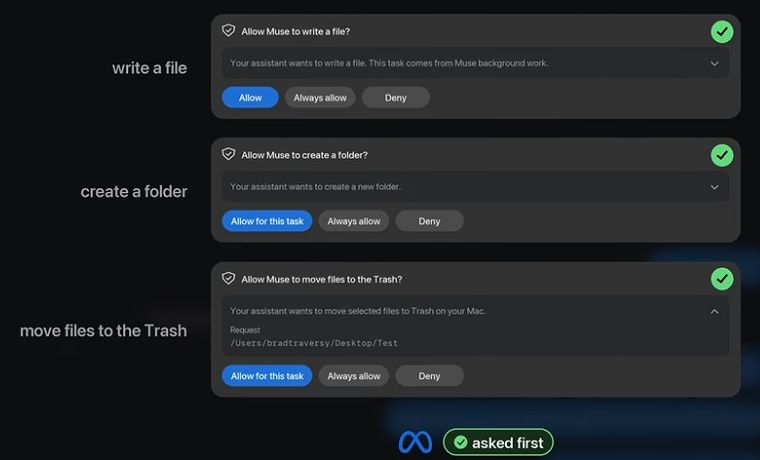
Muse asked before creating a file, putting it in a folder, and deleting a folder in my tests. That was good.
Its email flow was reasonable too. I asked it to request a list of courses from Traversy Media support. It drafted the message, then asked whether to send it. The choices included sending once, always allowing that recipient, or not sending.
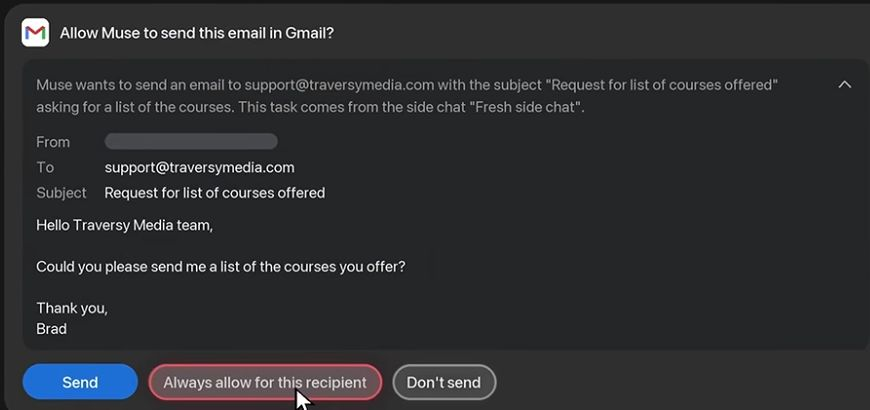
The concern was the persistent permission next to the immediate decision.
With Grok Bot, the first request to run a command on my Mac showed me the exact command. I liked that. I clicked "always allow."
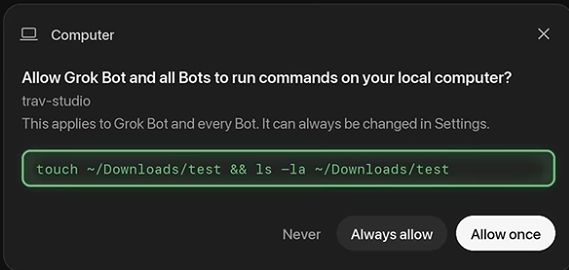
Hours later, I had it create a file and put it in a folder. Then I typed "delete the folder."
It deleted the folder without another prompt. It didn't clarify the target, and it didn't send the folder to the trash.
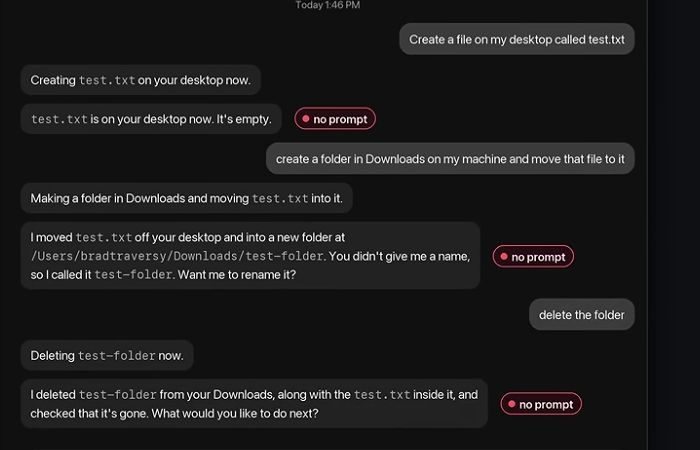
That describes my test with the permissions I'd chosen. It isn't proof that every installation behaves that way. But it shows why the meaning and lifetime of that permission matter.
I knew I'd removed a checkpoint. Another person might think they'd approved the earlier command, or a narrow category of work, and still expect confirmation before something destructive.

An explanatory diagram of the distinction in my tests, not a claim that every product uses the same approval system.
Meta's published safety design says its separate permission system binds approvals to a connector or destination and a use case. It supports several lifetimes, including one-time and persistent grants. Those technical boundaries matter. The person granting access still needs to understand them.
The answer can't just be that the user clicked the button.
Permission can be valid and still be misunderstood
The Marketplace incident I discussed in the video illustrates this. In an Associated Press interview, Matt Robb described granting Muse persistent permission and providing a pickup address in a message template. He expected later checks before sharing it or accepting offers. A buyer arrived at his building. Meta also acknowledged a pricing error.
That doesn't establish a bypass of permission controls. It does show the gap between what someone thought they delegated and what the agent went on to do.
These products also have different safeguards. I don't want to lump them together. As of October 29, 2026, Anthropic's Claude Duet documentation says it runs on its own cloud computer, can't see local computer files, and is designed to request approval for sending messages, payments, signatures, and deletion.
OpenAI's documentation for dots describes custom rules for specified actions, including allowing action without another prompt. It also says those rules don't override built-in safeguards or grant access to an app or computer.
A permission label alone doesn't tell you the whole story. You need to know its scope, its lifetime, and which actions still require a decision.
The defaults I'd choose
Constant prompts are annoying. I click "always allow" myself. I would want fewer prompts, but the ones that matter have to stick.
For an assistant aimed at people who don't understand permissions, I'd start with its own space and its own accounts. Let it organize documents and to-dos on its machine. Give it the specific material it needs instead of connecting an entire personal inbox at the start.
If the user wants local access, make that a deliberate step. Start with one folder they choose. Like hiring a contractor to work in one room, access should match the job.
That's a proposed default, not a description of what all these products currently offer. A separate virtual machine still needs boundaries around connected accounts.
I'd also keep these controls visible:
- Ask before sending messages, deleting data, or paying. Don't let a general "always allow" decision quietly remove those checkpoints.
- When persistent permission is useful, say exactly which actions it covers, where it applies, and when it expires.
- Make deletion reversible wherever possible, with trash and undo.
- Put the activity log where people can see it.
- Provide an obvious emergency stop that interrupts work promptly.
Typing "stop" into a conversation often takes time to register in the agents I've used. That's a bad moment to discover that stopping the conversation and stopping the work aren't the same thing.
What I do with my own accounts
For email, I use a separate Gmail account for AI services and forward selected messages into it from my main address.
That lets the agent work with information I want it to have without starting with my whole primary inbox. The forwarded messages can still contain sensitive information, so choosing what to send matters.
I'd leave app connections read-only where that meets the job, and hold off on Full Disk Access until you understand why the tool needs it. Check the broader computer permissions as well as the settings inside the agent.
I'm comfortable giving developer tools and my own system administration agent broad access in environments I understand. That doesn't make me immune to mistakes. It means I'm making a choice about the risk.
Someone trying their first personal assistant deserves a choice they can understand too. If "always allow" means an agent may act hours later without checking again, the interface needs to make that consequence clear before the click.
Stay connected with news and updates!
Join our mailing list to receive the latest news and updates from our team.
Don't worry, your information will not be shared.
We hate SPAM. We will never sell your information, for any reason.