
Stop Vibe Coding: Build Software With AI, Feature by Feature
Aug 20, 2026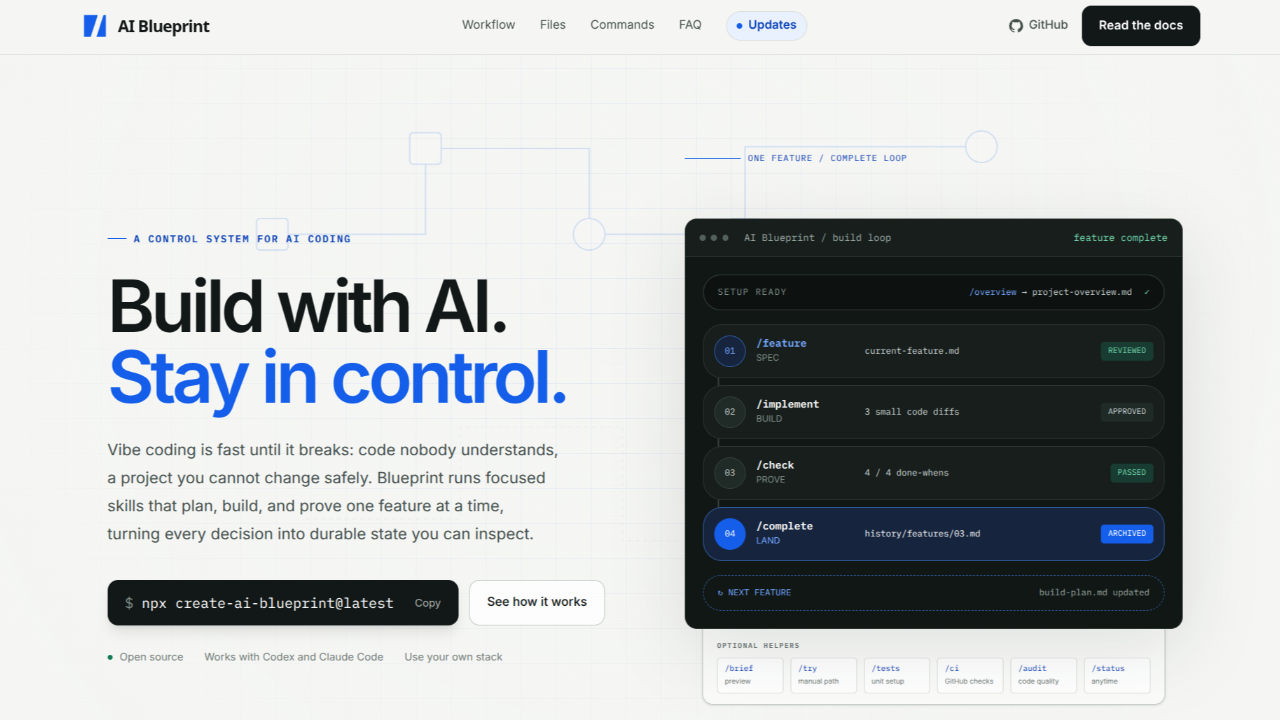
AI is changing the way we build software. You can describe a feature in plain English and get usable code back almost immediately. That can be incredibly useful, but it has also created a style of development where people keep prompting, accepting changes, and moving forward without understanding the code underneath.
We call it vibe coding. It can be great for experiments and prototypes, but it is a dangerous way to build software you actually plan to maintain.
Specs-to-Code Workflow
Specs-to-code is a much better way to build with AI. When I say vibe coding, I mean prompting without understanding what is actually being created. With specs-to-code, you describe what you want in Markdown files and have the AI implement it one feature at a time.
I did not invent this process. I even created a 16-hour course that teaches it at a lower level. The problem is that specs-to-code without a larger workflow can get messy very quickly. In the course, we create something like 50 Markdown files. AI can help create them, but you still need to organize everything and think about testing, CI, guardrails, Git, and project history.
I wanted a reusable system that handled that structure for me, so I created an open-source workflow called AI Blueprint. I now use it for literally every AI-assisted project I build.
How It Works
I created a YouTube video on how this works as well, but AI Blueprint is not a framework, and it does not generate an entire application from one prompt. It sits on top of whatever you are already building and gives both you and the AI a process to follow.
-
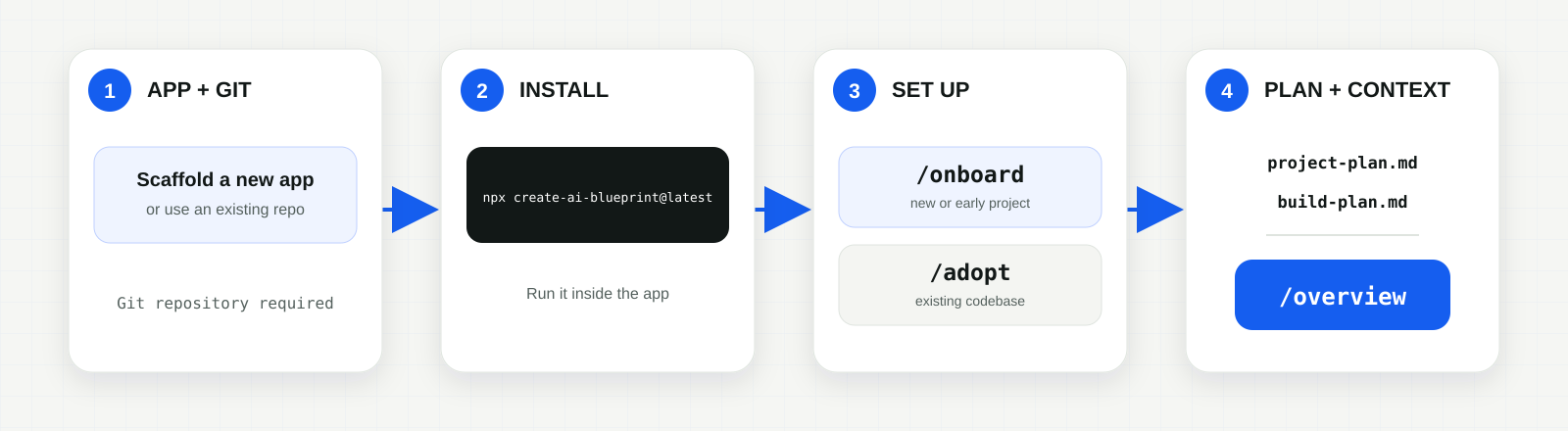
Start with an application. Scaffold a new app or use an existing codebase. Make sure it is a Git repository.
-
Install AI Blueprint. Run the installer from inside the application:
npx create-ai-blueprint@latestThe installer asks which AI tools you use and adds only the workflow files and adapters you need. It does not touch your application code, replace your framework, or add a runtime dependency. The plans, specifications, rules, and project history remain plain Markdown inside your repository.
Codex and Claude Code have native adapters, while other tools that understand
AGENTS.mdcan still follow the readable workflow instructions. This means your project state is not trapped inside one chat session or tied to one AI tool. -
Match it to the project. Run
/onboardfor a new or early project. Use/adoptfor an existing application with shipped features. -
Create the project context. Fill in
project-plan.mdandbuild-plan.md, then run/overview. You can write the plans yourself or use/discoveryto develop them through a guided conversation.
At this point, no feature code has been written. You have simply given the AI a clear understanding of the project, the order in which it should be built, and the rules it needs to follow. Now you are ready for the feature-by-feature build loop.
The Build Loop
Once the setup is complete, you work on one feature at a time using the main build loop:
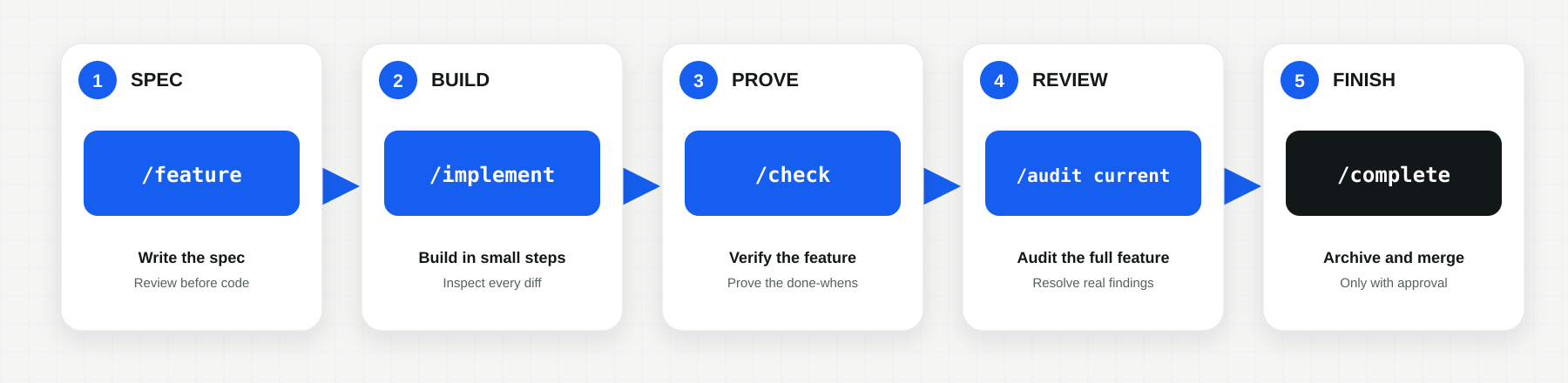
The /feature command takes the next item from the build plan and creates a detailed specification. More importantly, it stops before writing any code. You review the scope, implementation steps, and definition of done before allowing the AI to continue.
Once the spec looks right, /implement builds the feature in small steps. After each step, you can inspect the changed files, review the diff, and see which checks were run. This is where AI Blueprint differs from blindly prompting until something appears to work.
After implementation, /check proves the feature against the original requirements. /audit current reviews the complete feature branch for problems that may not appear in normal tests. Finally, /complete archives the work, updates the build plan, and merges the feature only after you approve it.
If the feature needs hands-on testing, /try gives you a walkthrough of what to open, what to click, and what should happen.
What This Looks Like in Practice
Imagine the next item in your build plan is a password-reset feature. Without a spec, the AI could immediately start creating routes, tokens, database changes, emails, and UI without making the full scope clear.
With AI Blueprint, /feature first defines how a reset is requested, how long a token remains valid, what the user sees when something fails, which tests must pass, and what is outside the scope. You review all of that before any code is written.
Once you approve the spec, /implement builds only that feature in small steps. You inspect the changes as it works. /check proves the completed flow against the requirements, /audit current looks for deeper problems, and /complete archives and merges it only after you approve the result. Then you move on to the next feature.
More Than the Build Loop
The feature loop is the core of AI Blueprint, but it also includes tools for the parts of development that are easy to ignore when you are moving fast.
- Testing and CI:
/testsadds or normalizes unit testing for the project./cicreates one project-specific verification command and matching GitHub checks. - Project health:
/doctorchecks the Blueprint setup, plans, commands, and adapters./statusshows what is complete, what is active, and what to do next. - Debugging and recovery:
/debuginvestigates a failure before changing code,/fixcreates a focused spec for an unplanned bug or small change, and/rollbacksafely reverses a completed feature without erasing its history. - Release preparation:
/releasechecks whether a project is ready for Render or Vercel, but it does not deploy anything automatically.
You do not need to use every command on every project. The point is that testing, CI, debugging, rollback, and release preparation are part of the same workflow instead of things you remember after the code has already become a mess.
Is This Overkill?
Sometimes it is. If you are testing an API, exploring an idea, or creating a throwaway prototype, you probably do not need a complete specification and review process. Vibe coding can be perfectly useful for that kind of work.
The workflow starts earning its keep when other people depend on the software, when you plan to maintain it, or when a bad change would be difficult to unwind. A little structure up front can save you from trying to understand a pile of AI-generated code later.
Staying in Control
AI Blueprint does not make AI perfect, and it does not remove your responsibility as a developer. You still need to read the code, question bad decisions, test the actual behavior, and understand what is being added to your project.
That is really the entire point. You still get the speed and convenience of AI, but you are not handing over your entire codebase and hoping for the best. Every feature has a plan, every change can be inspected, and every completed piece of work has a history.
Try It on a Real Project
The best way to understand the workflow is to use it on one small, real feature. Install AI Blueprint in a Git repository, create or review the project plans, and take a single feature through the complete loop. Do not try to plan and build the entire application at once.
- Read the AI Blueprint documentation
- View the AI Blueprint repository
- One hour YouTube video demonstration
- Learn the lower-level specs-to-code process in my Coding With AI course
Related reading: How AI Reignited My Passion for Software Development and Coding Before AI Wasn't the Stone Age.
Stay connected with news and updates!
Join our mailing list to receive the latest news and updates from our team.
Don't worry, your information will not be shared.
We hate SPAM. We will never sell your information, for any reason.